If you have a computer, tablet, or mobile you most likely have some of your data stored in the cloud. It may just be syncing your contacts or calendar, or even backing up your photos from your iPhone or Android phone. Whatever the reason it is now a cheap way of keeping your data safe. Or is it?
Never take for granted that your data is getting backed up correctly. Check it yourself.
I had a situation just recently where my wife’s iPhone had just gone through a 60℃ wash.
“That’s okay,” I said, “We have all your data on iCloud…”
A few days later we replaced the phone (thanks insurance) and restored the data back from iCloud. That’s when we discovered iCloud hadn’t been copying Contacts and some other data. Fortunately I had also kept another backup using iTunes on my Mac so was able to restore from there.
Now would be a great time to check your iCloud settings and make sure there’s a green tick next to everything you don’t want to lose!
Another thing to look out for, especially if you have a lot of data, is your upload speed. Unless you have fast broadband, uploading large amounts of data can take time. You’re unprotected until all of the data has reached the cloud. In some cases it can take hours, even days, depending on how much data you have and the speed of your network.
Once you have uploaded all your data, your device will only need to copy new changes so won’t take so long. As a Plan-B, don’t forget to backup to a computer once in a while. You can thank me later.
Don’t leave it until it is too late. You never know when your phone will take a spin in the washing machine.
When Apple release the latest version of macOS (named Sierra) in Autumn, it will include the new APFS filesystem. Apple haven’t launched a new FS for a long time, and this filesystem won’t work for bootable disks at first. Eventually Apple will make this the default filesystem across the whole product line, from the iPhone, through to the Mac.
APFS Data Recovery
APFS Upgrade In Place
I have heard that Apple will release a tool to upgrade an existing HFS+ volume to APFS. If you run the upgrade I strongly advise you to make at least a couple of backups first. I would suggest a Time Machine backup and a bootable full disk copy, with online backup if you have it. While the upgrade is cleverly designed to minimise the risk of disk corruption, there is always the chance that failure could leave you with no option but wipe & start again. This is especially true of older Macs that you may have updated through multiple OS versions and accumulated all sorts of nasties along the way.
APFS Data Recovery
We are already working through the APFS documentation to keep ahead of these failures. We will have some recovery tools ready soon. As with most recoveries, the most important thing is to stop as soon as you hit a problem. Remember my new catchphrase, “Most damage to data happens AFTER the original failure!” Or, “It’s not the failure that killed the data, but the failed repair.” (I know, snappy right.)
If you’re a Mac user in Portsmouth & Southsea you might be interested in our Mac Services. We’ve been helping Mac users sort out common and not-so common issues for years. We offer low hourly rates for on-site assistance, No callout fees, and fixed price repairs if you bring the machine to our workshop.
Also, as a specialist Mac data recovery company you can be sure we’ll never do anything that could harm your data.
If you are in Portsmouth or Southsea and having Mac trouble, give us a call on 02392 671 330
We recently received a Macbook Pro for data recovery. When we removed the broken hard drive and installed a new one for the customer, we noticed that the trackpad was not working correctly and would not click when pressed. We dismantled the Mac again and removed the battery which was underneath the trackpad. When the battery was removed we found that the underside of battery had blown and was pushing against the trackpad. We installed a new battery, recovered the customers data and now the mac is working fine.
This drive has a hardware problem that can’t be repaired. Back up as much of the data as possible and replace the disk. See an authorised Apple dealer for more information. S.M.A.R.T. Status : Failing
If you see the message above, your hard disk or SSD has started to fail and has reported faults to the Mac. If caught early enough, these disks can usually be recovered. You can try to copy important data to another disk but if the copy process gets stuck for a while, it’s safer to stop. If you leave a failing disk in that state it can deteriorate until the disk is ruined.
If the data is really important, and you’d rather not take the risk, you could have a look at our Mac Data Recovery Services. We have been dealing with these sorts of problems for years and have a developed a really safe way to get the data off in good condition.
Whatever you decide to do, don’t ignore this message. The broken disk cannot repair itself, and will only get worse. In many cases, the disk won’t even be readable by the time you see this warning.
It doesn’t matter if the disk is still inside your iMac or MacBook, we can remove it for you, and even replace the drive at the end of the recovery process if you want. Ask about our Mac Setup service if you are interested.
This year we have seen a fair number of these particular model hard drives with internal media damage caused by a head crash. These are 3.5″ hard drives from external cases such as Seagate Freeagent Go-Flex and Seagate Expansion Desktop. They are also used as internal hard drives in PCs running Windows 7 & 8 also used in Apple iMac’s running OSX.
It has been difficult to confirm whether the media damage seen has been caused by an impact such as a dropped drive or from general electronic failure. What we do know is that as soon as you hear one of these hard drives start to click, then if you have not already got a backup in place, backup your data immediately.
On an Apple Mac running OSX the first sign of a problem is usually a spinning beach ball resulting in slow access. On a PC running Windows 7 & 8, the signs of a hard drive problem are once again slow access and lack of movement from the mouse icon.
If you have a problem with a Seagate hard drive, have a look at our Seagate Data Recovery Services. If we catch it early enough we should be able to recover the data!
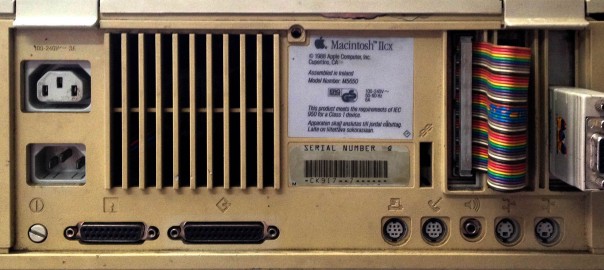
You may be surprised by some of the old computer hardware that’s still used by some companies today. Especially where they are used as the control interface for manufacturing purposes. We recently received a Quantum 40MB SCSI II hard drive from an old Macintosh IICX that was controlling a piece of 7 Ton Fabricating equipment. The software communicated to the CNC equipment through an internal Nubus card with SCSI interface. For the customer it was not just a case of getting the user data off the drive, but to get an exact image so they had a bootable drive with all the relevant software and drivers to run the CNC machine. With our experience in old computer hardware especially old Macs and DOS based PC’s we were able to recover the data from the hard drive and make a bootable replacement drive to get the customer back up and running. For the customer there was no other option but to get his old Macintosh IICX back up and running as new CNC equipment was too expensive.
Old Macintosh & DOS CNC Machines
Macintosh IIcx Bus Error
This is not the first time we have been involved in this sort of request and process. Back in 2008 we had a similar situation with a customer who had a CNC milling machine that was run by an old DOS PC with a Fujitsu M2682TAM hard drive. Again we managed to get a bootable image back to the customer.
So if there is anyone out there running “obsolete” PC’s or Macs, then you know were to come to get the best outcome.
This OWC external enclosure is a common sight on the desks of Mac users with big storage needs. It’s a pretty standard 4-bay box, styled somewhat like a cousin of a PowerMac G5 or 1st generation Mac Pro. Inside are the usual options of RAID 0 to RAID 5 with a few additions like JBOD & RAID 10 thrown in for good measure. There are a few variations of this device but the back panels commonly have USB, Firewire, and eSATA ports for direct connection to a PC or Mac. There is no ethernet port on these drives which makes the Qx2 a DAS (Direct Attached Storage) rather than NAS (Network Attached Storage).
Aside from massive name, the OWC Mercury Elite Pro Qx2 also comes with a potentially huge amount of storage. Currently up to 32TB on the OWC store, but also available diskless or BYOD (Bring your own disks). With so much storage space, these drives often become the one and only repository for vast lumps of important data. The benefits of RAID give a false sense of security that the data is safe from drive failures. Unfortunately, there are a number of reasons why the RAID array alone will not protect from certain failures. Most of these failures can be overcome by us in our workshop, but they are not one-button fixes. It is helpful to understand why a seemingly rock-solid platform can be even more risky than a simple external USB drive.
Redundancy
Under common settings, the Qx2 will use RAID 5 for the array. With four 2TB drives this gives you a 6TB volume on a Mac or ~5.5TB on a PC[1], and can cope with a single disk failure. There is a lot of debate about how good RAID 5 really is for such large drives[2]. In our example this means that if a single disk fails, it will need to be replaced, and then the new disk rebuilt with 2TB of data calculated from the other disks. This will take many hours, even under optimal conditions, but if anything goes wrong before it completes the array could stop showing up all together. At this stage, the data is probably recoverable but don’t panic. One wrong move and the data could be gone for good.
If the data is crucial then get assistance from a RAID recovery service now and you should get back all or most of the data.
If any disks are removed or replaced at this point the array could get reinitialised and either make the recovery more complicated or wipe the data completely.
Other Failures
Aside from all the problems with a RAID setup, the volume could also fail in the same ways that a standard hard drive can. There could be deleted files, a reformatted or corrupt partition, or even the RAID controller failure. RAID cannot protect against those types of failure at all.
Recovery
Our first step would be making read-only copies of each disk in the array. This protects against further disks failing, and also allows us to work from copies without risking the original disks. In fact, once the disks are copied, we put the originals to one side and don’t touch them again until all the data is recovered and supplied back to the user.
Once we have our copies, they are loaded into our own hardware where we recreate the RAID in a virtual environment. Again, we don’t use the original hardware, as that may have been the root cause of the problem.
When the virtual RAID has been loaded and all the data extracted, the files are supplied back on whatever alternative storage is suitable, (not the original device!) Once the data has been delivered to the user, and backups made, the old unit can then be destroyed, or returned and reused.
Avoidance
Anyone using RAID on a regular basis should know that RAID is not a replacement for backups. If anything, the increased number of disks makes failure more likely. This needs to be addressed by either making backups to another device, or an online service (preferably both). You ideally want backups that keep historic versions of the files, so that inadvertently deleting a file or changing a file by mistake will not also replace the backup version.
If you are having problems with an OWC Mercury Elite Pro Qx2, give us a call or send a message via the form on this page. We give free advice and could help you avoid permanent data loss.
1. Macs now use 1000 bytes for 1KB but PCs use 1024 bytes.
2. Even RAID 6 does not solve the long time required to rebuild a disk, even though it allows for two disk failures.
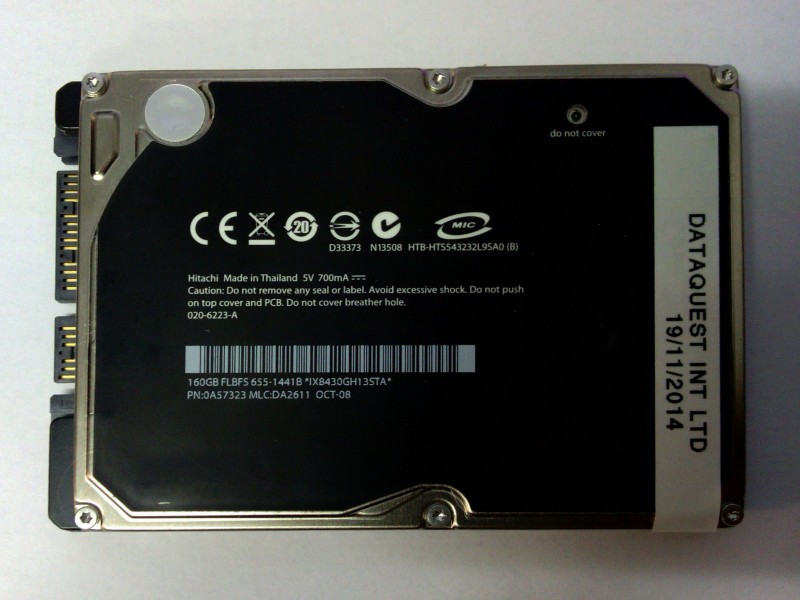
Just recently we received a failed HTS543232L9SA0 from a Macbook Pro. When we carried out the initial diagnosis we noticed that the drive capacity was 160GB and not 320GB as the model number suggests. The Model number should have read HTS543216L9SA0. This particular hard drive has a black label which is different than most Hitachi drive labels of the same type. When we opened the drive in our clean room we found that the drive only had two heads compared to a 320GB which has four. When the drive is attached to our hardware or a PC it identifies correctly as a HTS543216L9SA0.
I’ve previously written about the difficulties recovering data from modern iOS devices. This new post by Avast(!?) shows it from another angle. What happens when you sell an old device?
TL;DR
Because iOS uses hardware encryption on the main storage, recovery is almost impossible without the passcode. In contrast, Android phones (usually, by default) don’t encrypt the main storage. Also they allow external SD cards which may not be encrypted either. This means if an iPhone and an Android phone are sold or lost without being carefully erased, the iPhone will not easily give up the data but an android phone will. It also means if you forget your iPhone passcode you are unlikely to ever get the data back.

 In the course of recovering data for our