Reports came in over the weekend about a nasty problem caused by installing the new release of macOS Big Sur. If you have a 2013 / 2014 MacBook Pro, it’s best to wait for Apple to release a fix before you attempt to install the update.
If you’ve already installed the update
Although you may not be able to boot the laptop, and all startup keys will fail to get it going, we will still be able to recover your data from MacBooks effected by this problem.
You need to proceed very carefully, as some online advice suggests erasing the Mac which means you’ll lose all your data!
We keep a large stock of Western Digital hard drives for our own data recovery needs. If you need any spare parts, please get in touch. Below is a list of some of the model numbers available. Contact us for specific matching criteria.
We can provide preamp matches, PCB matches, Date code matches, Head map matches.
We keep a large stock of Seagate hard drives for our own data recovery needs. If you need any spare parts, please get in touch. Below is a list of some of the model numbers available. Contact us for specific matching criteria.
We can provide preamp matches, PCB matches, Date code matches, Head map matches.
Things have changed quite a bit since the start of the week, so here is an update.
We are still working and don’t plan to stop. Our work is always solitary and doesn’t depend on many outside factors. Some deliveries are taking extra time to reach us, and some online stores are struggling to keep up with orders as more shops have closed. Most of these things are solved by waiting a little longer, so we hope you can bear with us, especially if we’re waiting for deliveries.
As long as we can still receive drives to recover, we’ll keep recovering them. If you need data recovery and want to know how the service is affected, please get in touch. E-mail is still the best way to contact us at the moment.
***
Previous Update From 20-3-2020
We’re already working from home, so we don’t expect any major disruption to our service. Even under lockdown, we’ll still be able to continue working on your recoveries. For everyone’s benefit we’re already asking people to drop parcels at the door instead of coming in. As a precaution we’re wiping down anything that comes in to our workshop, and anything that leaves us.
We’d really appreciate it if you call or e-mail before you turn up at our door.
Our thoughts are with everyone currently affected by the virus. Keep calm, wash your hands, and stay up to date with the official news (ie. Don’t get your news from Facebook!).
If you’ve survived without backups and not lost data, you’ve been lucky so far. But why push your luck? There are a bunch of free & cheap ways to backup that could save you from the pain of losing data. Even better, you could help out your family, and give a gift that almost nobody will thank you for. At least until they drop their phone down the toilet. Then you’ll be hailed a total hero!
What is a Backup?
First, I have to get this out of the way. A backup is an extra copy of the files. If you don’t have two or more copies of something in different places, it’s not a backup. A common mistake is buying an external “backup” drive, and then filling it up with data that you don’t have anywhere else. All that does is move the problem from one disk to another. If the “backup” drive fails you’ll still need to get it recovered professionally (👋). If you had another disk with the same files on, you’d be fine. It might sound wasteful to keep multiple copies of your files, but it is the only safe way. Even the most reliable disks have a 1% failure rate. If you made a backup copy of a paper document, you wouldn’t shred the original, so just think like that.
What is a Cloud? ☁️
A cloud is just a server somewhere. Modern cloud services are just huge networks of servers that can store your data.
iPhones & iPads
iCloud
If you’re an iPhone or iPad user, you can’t beat iCloud for convenience. With an iCloud backup, you can load a replacement iPhone or iPad with your data, and carry on where you left off. It might seem unfair that Apple will sell you a phone for £1,099 and then want an extra £0.79 per month for iCloud, but once you get past that, it really is worth every penny. For under £10 per year, you’ll be mad to not sign up.
Family Sharing
If you have multiple iPhones & iPads in your household, you can also share iCloud storage using Family Sharing. That way, you can buy one of the larger storage plans and backup all the iDevices in your house. All the data is still kept privately for each person in iCloud, but the total storage is shared. This will also give you some other useful features like shared family calendars, notes & reminders.
Google Photos
Google photos works across pretty much any device. It doesn’t matter if you run it from your iPhone, Android Tablet, a PC, whatever. The free version only has a fairly small allowance (currently 15GB), but you can then pay extra for more storage as you need it. (£24.99 per year for 200GB in 2023)
Android Phones & Tablets
Google One. That’s the Google equivalent of iCloud and has tools to backup devices, and photos. (See above.)
Mac & PC
Regardless of what PC or Mac you have, you can’t beat an external hard drive for value. As long as your internal disk is big enough to fit all your files, you can then use an external drive to keep an extra copy of everything. If your internal disk is too small, the best option is to upgrade it, and then also keep an external backup drive. If you don’t (or can’t) upgrade the internal disk, you’ll need to juggle data and backups around external disks. This increases your risk of missing something.
Computers can also use cloud storage, so if you already use one on your phone, it’s worth seeing what you can share with your PC or Mac.
iCloud on your Mac will let you sync photos and documents but doesn’t allow you to backup and restore to the cloud the way it does with iPhones. If you use iCloud on a Mac, I’d still recommend an external drive.
Attach an external drive to a Mac, and it will offer to use it as a backup with Time Machine. ⚠️ Be aware that it will erase the disk first! Time Machine will take a copy of your whole Mac, and keep it up to date. Even if you only plug the disk in once a month, Time Machine will catch up with any new files and copy them over automatically. If your Mac dies, you can use the backup drive to load the data to a repaired or replaced Mac.
Windows 10/11 has a backup feature named “File History.” Much like Time Machine, you can select an external disk for backups, and then file history will keep track of file changes automatically. Unlike the Mac, File History doesn’t backup software and settings, so you’d need to get things setup another way first before you load the files back.
Conclusion
Do yourself a favour and get your files backed up. Remember, you don’t need to backup everything, just the things you don’t want to lose 😜!
Back in the bad old days (mid 2000s), before SSDs and 8TB hard drives, PC builders faced a difficult decision. Everyone wanted more storage space, but large disks were expensive. Fortunately for the manufacturers, most PCs could invisibly combine two smaller & cheaper disks into a larger one, using RAID 0 (Redundant Array of Independent Disks). The technology had previously been confined to data centres where servers used RAIDs for various performance & security benefits. Unfortunately for most customers, they had no idea this was happening in their PC until things stopped working. Either the customer, or a technician would open the PC to find two smaller disks where they expected to see a single larger one.
If you were lucky, the tech would call in a specialist 👋 and your data would be recovered safely. If you were less lucky, there are lots of ways to wreck this setup.
The best way to trash a RAID 0 is by not realising that’s what you’re looking at in the first place. It’s easy to mistake the disks as two independent disks. We’ve seen far too many cases where one of the disks was erased or reinstalled with Windows as an attempt to resurrect the PC. At best, this will make the recovery difficult. At worst, it can make recovery impossible.
Without trying to sound like a broken record, this is another example of my catchphrase – Most damage to data happens AFTER the original failure.
Due to changing conditions, we now charge extra for replacement parts. As an example, we recently had to source a 4TB Seagate portable drive that was over £150 and a 4TB Western Digital for £262! There’s no way we can cover those costs. When we first started, we could usually find spare parts for just £30-40.
So what happens if we need expensive parts to recover your disk? First, we’ll try our best to source parts as cheaply as possible. This often means scouring eBay and other similar sites. The difficulty is that not all vendors will give us detailed enough information to confirm a good match. In most cases we need a very similar disk that was manufactured within a few months of yours. In some cases, this level of detail can increase the cost by 400% compared to an equivalent new disk.
Once we’ve found the parts, it’s up to you. Either you can pay for the additional parts and we’ll continue with the job, or you can cancel the job and we’ll call it a day. Everything has a value, and if the costs are too high, we totally understand.
It’s been a longtimesince I’ve written about iPods on this blog. 2008 was the last post I could find.
In that time, SD cards have become so cheap they’re almost disposable, and iPods have virtually disappeared from normal life. But I still have one, and I still love it. I built this FrankenPod about ten years ago from a pile of broken iPods so it’s always looked a mess. The back cover came from an 80GB iPod Classic, an 80GB hard drive from a MacBook Air, and all the other internal parts were scavenged from various broken iPods. The plastic screen was already covered in scratches, so I never felt too bad about stuffing it into a pocket with coins or other junk. Not my usual style!
Upgrade Time
The battery had started to show its age so I set about replacing it. I assume parts will eventually start getting hard to find, but eBay is still full of spares for now.
I had to dismantle the iPod to replace the battery anyway, so I had a look at the other parts to see what else I could fix up. Then I remembered the iFlash adapter. I’d previously used a similar adapter to add a Compact Flash card to an iPod 4G, so I checked to see if there was an updated ZIF adapter. There sure is! And better yet, it works with super cheap, fairly fast SD cards. Add that to the parts list.
Fortunately, the scratched exterior screen on this iPod has protected the delicate LCD screen inside, which is still in perfect condition. The Clickwheel™️, headphone port, and dock connector are all in good enough condition to keep.
My original plan for the front case of the iPod was to strip it down to bare metal and then prime and repaint it. I wanted something unique so thought I’d end up going for a bright yellow or chrome effect paint.
Enter The Rat 🐀
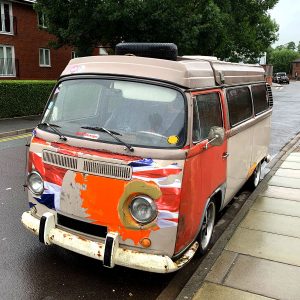
Scruffy Rat VW Bus
I started sanding the surface and realised how tough the anodised metal is. How it got so scratched up is a genuine mystery. I think this thing would survive a nuclear war. I went to work with sanding disks, grinding wheels and all sorts of abrasives and barely got through the top layer. As I was sanding, I started to like the way the iPod looked. My new idea was a RatPod. In the style of rat bikes, I would leave the outer surface looking messed up, but upgrade the internal parts. I couldn’t bear looking through the scratched screen though so still went for a replacement on that. I finished sanding the rough bits off, and making the surface silky smooth. The way all the edges are outlined by bare shiny aluminium looks pretty cool 😎.
iFlash
I chose the iFlash Solo for this project. This lets me swap the hard drive for a cheap SD card. My iTunes Library is only around 35GB so a single 64GB SD card will give me plenty of space for the future. (iFlash also sell adapters that take mSATA SSDs, or multiple SD cards for up to 1TB of music.) They ran a test a few years back about different storage options and found that microSD cards are pretty hard to beat for cost & power consumption, at the loss of a tiny amount of speed. They’re still way quicker than the old HDD, so that’s what I went with. The iFlash Solo has a full size SD slot, so I used the micro adapter that came with the Sandisk card.
Restore
While waiting for the screen glass to be delivered from China, I decided to connect all the other new parts and test the iFlash adapter. With everything loosely assembled I plugged in the USB cable, launched iTunes, clicked “Restore” and then…
The iPod could not be restored. An unknown error occurred (1394). ⚠️
Uh oh ☹️. I clicked “More Information” and expected the usual generic message. Instead I actually got a clue. It said the restore may fail if the battery is too flat. I can’t help but wonder how long this battery had sat in a box before I bought it. Anyway, I waited impatiently until the iPod was fully charged and then boom! iPod restored without issues. I loaded up some music and gave it a play. It works fine, and nice and quick.
The Finished Article
The finished iPod Classic.
I’ve only had this finished for about a week, but already there are a few things to note:
Starts playing music almost instantly
Feels really lightweight
Now shockproof
Perfect in the car
With the new battery, this thing lasts forever!
I was worried about support in macOS Catalina, but it’s OK
Update After a Week of Use
I had a few teething troubles with the iPod that didn’t appear immediately. After a few days working fine, I started getting intermittent skipped songs, or the iPod would just stop playing in the middle of an album. If left in this state, the iPod would eventually run out of battery and then need to be plugged in to bring back to life.
HFS+ What?
As I was using this iPod with my Mac, it gets reformatted to HFS+ during a restore. Information about MacPods is hard to find, but often the Windows formatted iPods need to be reformatted a particular way to prevent issues. As an attempted workaround, I’m currently using the iPod formatted for Windows, to see if that sorts out the skipping problem. You can use Windows formatted iPods on Mac but not the other way around. I’ll see how it goes.
Update 2021
Despite working mostly OK, I still had some occasional freezes with this iPod. I decided to crack it open again and try a different brand of SD card. I got a Samsung EVO plus 64GB, and touch wood, it’s been fine since. I’ve since checked the compatibility chart on iFlash, and it does have reports of problems with the SanDisk card I used before.
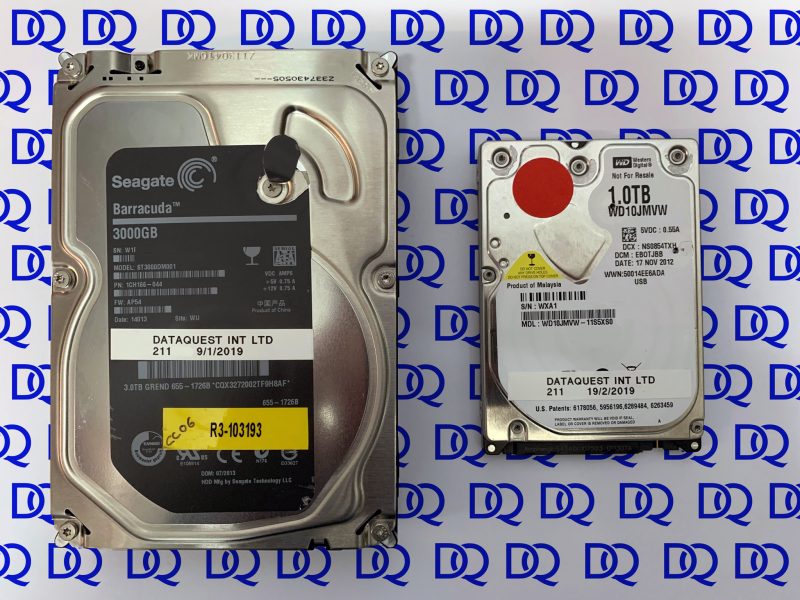
We recently posted on Facebook about a pair of disks that we recovered. Both had been sent around the market a little bit, so I thought they’d be worth writing about in a bit more detail.
We never like seeing open disks, unless we open them ourselves!
Disk 1 – 3TB Seagate drive from an Apple Time Capsule.
The disk had previously been sent to another lab for recovery. It was diagnosed as having multiple damaged heads, a stuck motor, cracked head-ramp, and microscopic damage to the disk surface.
Our Findings
We could see the screws and seals had been tampered with on the outside of the drive. When we took the drive into our cleanroom, we found sharpie pen markings on the various components. This usually indicates that parts had been removed or replaced. Of particular concern were the markings and screws around the spindle motor. With vertical and horizontal alignment, we never want to see a disk pack disturbed. We had no way to know if the disks had been rotated independently and had their alignment destroyed.
Although we didn’t know about the disk pack, our only way forward was to install new heads and ramp, release the stuck motor, and see how the drive responded. On power-up, the drive failed to reach readiness and we were unable to access the diagnostic mode. One tiny sliver of hope was that when we rebuilt the donor heads back into their own drive they still worked fine. This at least told us there wasn’t significant disk damage.
We installed a different set of heads, and this time were able to bring the disk ready using our diagnostic tools. We were able to extract a small amount of data before the heads stopped reading again. This time, we confirmed that disk damage had contaminated the new heads. This gets into awkward territory. The only way forward is to keep feeding new heads into the drive, resume the procedure, and keep extracting more data. In total we used three sets of fresh heads before we’d extracted all the files. We ended up with over 95% of the data recovered successfully.
Disk 2 – 1TB Western Digital My Passport drive.
This one was a bit different. The user had been given a good chance of recovery from another company, but been quoted over £1300 for the recovery. If you’ve been here before, you might know that we prefer to publish our prices online. You can see the costs before you even send a disk to us. The maximum price for a similar recovery with us was £488 but it was likely to be recovered for £329.
By the time we received this disk it had been sent to a second other company. One with a bad track record that I won’t name. They quoted an impossibly low fee but after receiving the drive raised it until it was higher than ours!
The more places that meddle with a disk, the lower chance we have of ever figuring out what the original fault was. In many cases we need to revert all the recovery attempts first, and then start from scratch.
This disk again showed signs that it had been dismantled so we took it straight into the cleanroom to check the internal parts. There was no sign of damage, so we rebuilt the drive and proceeded with our usual diagnostic routine.
We found a fault with the external electronic board on the drive so replaced it with a known good one. As with most modern disks, this also meant adapting the replacement board to work with our drive.
The drive showed some instability during imaging, but it completed successfully and allowed full data access. Why the disk had been opened during the previous recovery attempts is a mystery. It served no purpose, and just introduced the chance of contamination and misalignment that was no help to the recovery.
As expected, we ended up recovering the data for our lower fee.
The Moral of the Story
We always go the extra mile with a recovery. If you know anyone that’s had to give up on getting their data back, it’s worth sending them our way. We’ll never know how many more people have resigned themselves to never seeing their files again.
An important part of data recovery is staying ahead of new technology. It’s important that we are able to recover data from wherever people currently store their files. People once stored their most valuable data on a hard drive in their PC. Making hard drives is complicated and expensive, so only a handful of manufacturers had the resources to build them. The relatively small number of brands allowed us to became experts in the way those disks work & fail. Over time, some of those manufacturers merged or went bust. There are now just a few factories building disks. That’s not to say hard drive technology is standing still, it’s just a small enough target to keep an eye on. When Seagate release a new family of disks we scrabble around for a little while, and then ultimately find out how they work.
Enter the SSD
Solid State Drives have been on the horizon for a long time now. In fact, the three Macs within arms reach of me right now all have SSDs in them. The biggest problem for me, is that the barrier to entry to make SSDs is really low. There are thousands of factories in China alone with the capability to pump out millions of SSDs. Just buy some controllers and NAND chips, solder them to a circuit board — Instant SSD.
The Numbers
In 2018 there are only three hard drive manufacturers left. By comparison there are 35 SSD manufacturers listed — without including all the white-label, rebadged, refurbished, grey-market & clone drives in the market. If we estimate that each manufacturer produces three different product lines, you’ll get to 105 different types of SSD vs nine hard drive families. In fairness, I can think off the top of my head that some of these hard drive brands have more than three families of disk, but you get the idea. Staying on top of all those brands quickly goes from difficult to impossible.
The Future of Data Recovery
You’ve got to wonder if the future of data recovery will be choosing even smaller niches. Some companies may focus on recovering just one or two brands of SSD, and know that they at least have a chance of staying up to date with the latest technology.
Dead Ends
SSDs present a number of new obstacles to data recovery. Some of these are not challenges as much as actual show-stopping dead ends.
Does your SSD controller use encryption, wear levelling & compression? The answer is yes for most SSDs. What happens to the data if that controller fails? In some cases this means the data is gone for good. In other cases it could mean weeks or months of manual work. You can’t just solder on a replacement controller as it won’t have the necessary encryption keys, nor will it have any idea of where the data has been stored across the multiple NAND chips.