Author: John Wilson

  • Old Industrial Equipment Data Recovery

    Old Industrial Equipment Data Recovery

    It’s always interesting to see how a complex manufacturing line can be run from such old hardware. In this case we were sent a custom PC from a  machine that is used to fill and cap bottles.

    The first problem was trying to get the case open to remove the hard drive. There is no ifixit guide for this thing!

    Old Industrial Equipment Data Recovery
    Old Industrial Equipment Data Recovery

    Inside I found a 20GB Seagate laptop drive (dated 2007) running Windows 2000 along with the programs that control the machinery. The hard drive was connected to a proprietary motherboard that in turn connected to the machinery via serial ports.

    In this case, data recovery was not enough. What the client needed was a full working copy of the failed disk to reinstall into the system. The aim was to get the kit up and running and return it to the customer so they could carry on with work as soon as possible.

    We’re set up to handle exactly this sort of problem, so I got this recovered and returned within two days.

  • SandForce SSD Data Recovery Problems

    SandForce SSD Data Recovery Problems

    The low prices and high speed access of the Sandforce controller made it an appealing option for SSD manufacturers such as Toshiba, Intel, Kingston & OCX. But it soon became a problem for users when the SSD devices using these controllers started to fail in their computers after just six months of use. Usually it resulted in the device not being recognised by the computer bios, and not functioning at all.

    That was okay if you were happy to have it replaced under warranty by the manufacturer. The problem came when you wished to try and recover critical data that may have been stored on these SSD’s. The use of full hardware encryption on the controller and the device, meant that the data could not be recovered, even when using low level data chip removal.

    Fortunately today these controllers are not so popular, and as a result most mainstream manufacturers do not use them. But be aware that they can still be found in some non branded SSD’s.

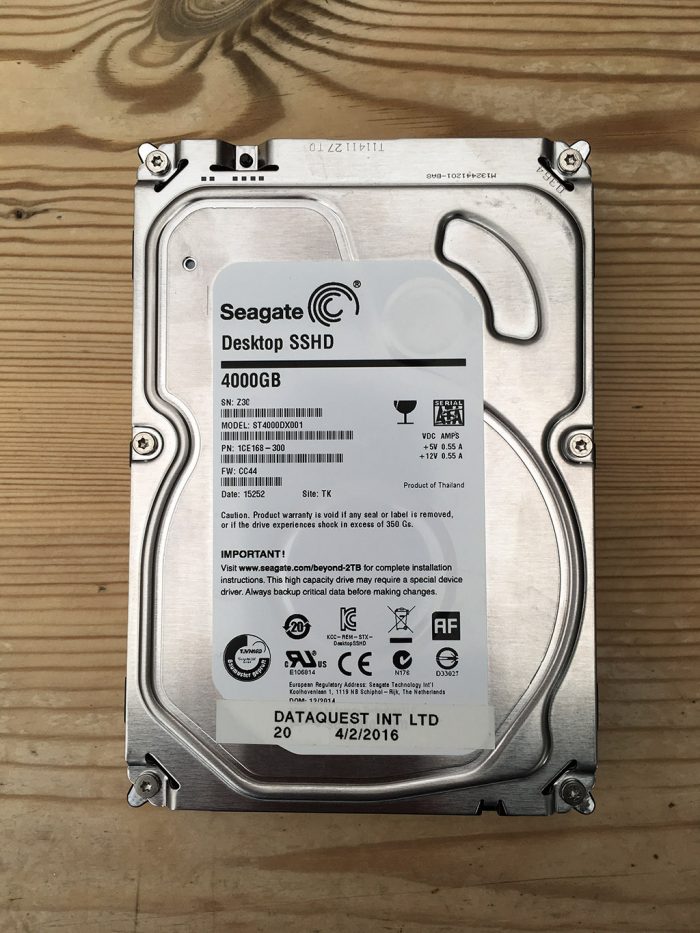
  • Seagate SSHD ST4000DX001 Data Recovery

    I previously posted about a Seagate SSHD ST500LM000 hybrid hard drive which failed to spin. This hard drive was put into our R&D process due to the type of the failure and further analysis confirmed that the problem was relating to the Solid State part of the drive. At the time I had only seen this type of failure with the Seagate Thin SSHD laptop drives. But since then we have now received Seagate desktop SSHD hard drives with the same type of failure.

    Because the SSHD hybrid drives are a cheaper option to SSD drives I am seeing more of them in for data recovery. Also as these are still mechanical hard drives, I am seeing many of the same failures as I do with standard hard drives. For example Electronic Faults, Dropped Drives, Water Damage etc.

    ST4000DX001 Data Recovery


  • Broken USB Stick

    Broken USB Stick

    I had a call on Friday from a very distraught lady who had dropped her laptop with her USB stick still plugged in. Unfortunately the USB stick took the brunt of the impact and all her work was no longer accessible. She contacted us and I reassured her that although the device was broken, we have a good chance of getting the data back.

    With time spent on the Broken USB Stick over the course of the day on Saturday, I was able to recover all of the data. I managed to get the data back to her on Sunday morning, so she could carry on working ready for the week ahead. I was also pleased to find out that the information on the USB stick was part of her charity work for people with special needs.

    The customer was local to us in Portsmouth so I had the pleasure in handing the recovered data to her personally.


  • What Is A Clean Room

    Some parts of our data recovery process require us to open a hard drive for internal repairs.

    John In Cleanroom

    We have a walk in clean room area on site, that allows us to carry out the necessary rework. It consists of an overhead air shower unit with a sealed enclosure that cleans and circulates the air within a specified tolerance. To keep particles to a minimum we wear a gown, gloves, and face mask to prevent contamination from outside.

    All hard drives are built in a clean room environment. Keeping small air particles out is crucial due the the complexity of the internal mechanism and tiny tolerance between the moving mechanical parts and internal disc surface that holds your data. When a hard drive requires any internal repair, it is critical that this work is carried out in a clean room.

    See our video about why you should never open a hard drive without a cleanroom.

  • Another Successful Dropped Hard Drive Recovery

    Another Successful Dropped Hard Drive Recovery

    Last week I was working on another dropped hard drive recovery sent into us by one of our Data Recovery Partners. I immediately took the hard drive into our clean room and removed the top cover for internal inspection. Although the hard drive had been dropped there were no visible signs of physical media damage. I replaced the damaged internal heads, rebuilt the hard drive and successfully recovered the data for the customer and Partner.

    Thankfully the partner had advised the customer to stop trying to access the hard drive as described in our blog. When they received the hard drive from the customer.  They sent it straight to us, without attempting anything themselves.
    These actions by the customer and partner were critical in the eventual successful outcome.

  • Macbook Pro Trackpad Not Clicking

    Macbook Pro Trackpad Not Clicking

    We recently received a Macbook Pro for data recovery. When we removed the broken hard drive and installed a new one for the customer, we noticed that the trackpad was not working correctly and would not click when pressed. We dismantled the Mac again and removed the battery which was underneath the trackpad. When the battery was removed we found that the underside of battery had blown and was pushing against the trackpad. We installed a new battery, recovered the customers data and now the mac is working fine.

    If you have lost data on your Mac, try our Mac Data Recovery Services

    Macbook Pro Trackpad Not Clicking
    Macbook Pro Trackpad Not Clicking


  • Successful 8 Disk RAID Recovery

    This was a RAID recovery with a challenge. The customer could only find seven of the eight disks from the RAID and two of them were not accessible. To make the challenge even more difficult, the customer did not the RAID level or any of the configuration. All we knew was the disks were from an old Dell Server.

    The RAID Recovery

    We first managed to overcome the failed disks and imaged all disks to our server. Once complete we analysed all of the images to determine the RAID settings and configuration. We found two different RAID’s with completely separate configurations. We used the settings to create virtual copies of the RAIDs and were able to carry out a successful recovery from both RAID Volumes.

    The client was gobsmacked by the outcome. You can see his comment below:

    DataQuest are amazing, we sent 7 HDD’s in a unknown raid configuration and with a failed hard drive, they managed to recover all the information we needed and more! I believed it was an impossible task, but obviously these guys know their stuff and are miracle workers! I thank the team at DataQuest and would recommend them to anyone! – Matt Bayley – February 29, 2016

    We had a very satisfied customer as well as very satisfied RAID recovery Engineer. Well Done Dan, give yourself a pat on the back.

  • Flood and Water Damaged Hard Drives

    Flood and Water Damaged Hard Drives

    With the recent floods in the United Kingdom, it is important to know that time can be a critical factor when trying to recover data from mechanical hard drives that have been submerged or damaged by water. Most mechanical hard drives have breather holes that may allow water to enter the hard drive enclosure if submerged. If this is the case then the longer the hard drive is left in this condition the worse the internal damage. Even if the hard drive is left to dry out, internally the damage has already been done. Our advice is not to try this if the data is critical to you or your business.

    Any water damage hard drives that we receive go straight into our clean room environment to be dismantled and dried out internally. The hard drives external electronics would also require a cleaning process to prevent any electrical shorting caused by the water residue.

    Although Solid Sate Hard Drives ( SSD ) do not have any mechanical moving parts, they are still prone to damage to the data chips and electronics by residue left by the water. Very much as mechanical hard drives they would require dismantling and specialist cleaning to ensure no electrical shorting of components.

  • Hard Drive Encryption Data Recovery

    Hard Drive Encryption Data Recovery

    Encrypted hard drives come in many forms. They can be created by the hard drive manufacturer as part of the hard drives firmware or as a third party software add on such as Symantec PGP or Microsofts Bitlocker.

    Hard drive Encryption is becoming much more common especially in many large enterprise companies. Some hard drive encryption is more sophisticated than others, but in many data recovery cases we receive, a common flaw is the inability of the encryption software to overcome bad sectors on a hard drive. In most cases it results in partial or no access to the decrypted data on the hard drive by the user or even their I.T dept.

    We have created an image and decryption process that allows us to recover the users data with the original file and folder structure intact. The time it takes to carry out this process will depending on the level of hard drive encryption used.