Author: John Wilson

  • You Can’t Win Them All

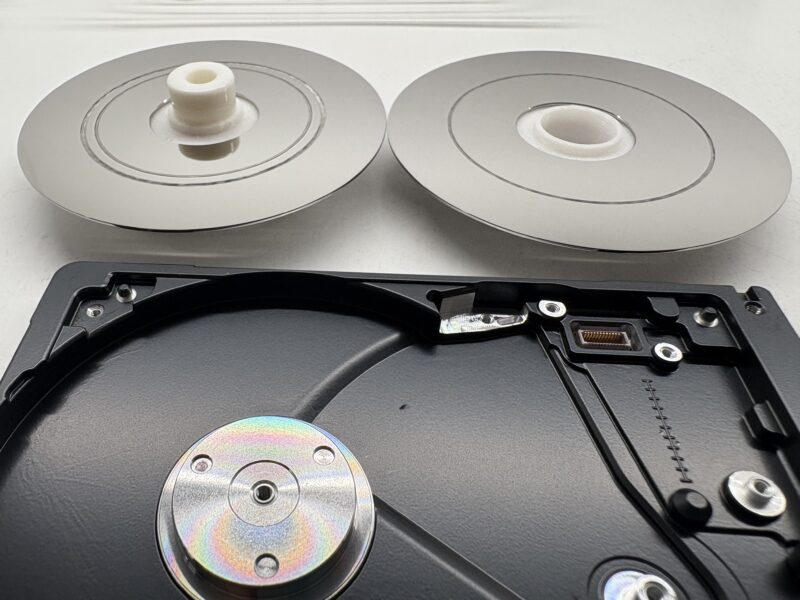
    We often get called Saviours or Magicians. But sometimes the magic wand just doesn’t work. This unfortunate drive had serious media damage on both discs and both surfaces. You can see the scratches are so deep they’re down to inner glass layer.

    The drive in question is Seagate Ultra Slim Portable. The damage maybe not be as bad as some we have seen in the past, but it’s still bad enough to prevent recovery.

    Click here to see more about Media Damage and other types of Failures.

  • Helium Hard Drives – Data Recovery Challenges

    A Bit of Background

    A helium hard drive is a mechanical hard disk drive with an internal enclosure filled with helium gas instead of oxygen. The enclosure is then hermetically sealed to slow the escape of gas. Helium creates a unique low density environment where the internal hardware can operate more efficiently resulting in less turbulence compared to air. With less rigidity in platter thickness required, this allows manufacturers to increase hard drive capacity by adding more slimmer platters into the same amount of space.

    The Data Recovery Challenges

    Less turbulence means less resistance so ideally opening a helium hard drive would be carried out in a helium filled environment. We have been successful in carrying out internal rework to allow access and attempt data recovery from helium hard drives in our clean room environment by using a strict and controlled process.

    Cutting Open a Helium Hard Drive

    Helium hard drives have a sealed aluminium top cover that is welded to its outer casting, so needs to be forcibly removed using a sharp implement. Some videos online show people using CNC mills, or saws to open the case, however we found1 that these allow small particles of metal to find their way inside the enclosure. This top cover keeps the helium gas trapped inside the hard drive. Once the external aluminium cover is removed the hard drive can then be taken into our clean room for decontamination. The internal cover can then be removed to carry out any internal rework required and then replaced once complete. The process of accessing the helium hard drive for data recovery uses the same hardware and technology as with standard hard drives. ie. Mapping used sectors, cloning to a working disk, and then extracting the files.

    Parts

    Helium filled disks are some of the largest on the market, so donor parts can work out expensive. In some cases the parts can cost as much as the recovery itself, especially when we need to match a certain revision or date of manufacture.

    The Outcome

    Recovering data from a helium disk is often a challenge, but something we’re happy to take on. Now if only all hard disks had a welded top cover, we’d never have to worry about people opening disks outside of the cleanroom any more!

    Contact Us Now…

    For a fast reply from a real person.

    Footnotes

    1. In testing, not with customer disks! ↩︎
  • Big or Small Old or New 

    Since we started offering our specialist data recovery services back in 1998 (😱) storage device capacity and speed has increased almost exponentially. New disks at the time were 6-30GB, but many disks we saw were much older and lower capacity. Now it’s common to see 8TB+ disks and even 100TB. Also physical storage device size has reduced to a mere 2.5″ form factor for a 100TB SSD or 6TB mechanical hard drive, and even smaller for “blade” SSD’s. 

    Blade SSD
    Blade SSD

    Keeping up with changing technology is crucial in being able to offer data recovery for the latest storage devices. 

    We do still see vintage storage come in for data recovery. From floppy disks, CDR and DVD+/-Rs, as well as removable cartridge media of all types, and of course old hard drives. So we need to keep old technology knowledge and hardware to support these old devices.

    We’ve seen many trends come and go during our time:

    • External drives with soldered USB-interfaces instead of removable bridge boards (which are now the norm).
    • External RAID drives, required when disk capacities weren’t growing fast enough.
    • The move from spinning disks to Solid State Drives
    • Storage chips soldered directly to motherboards instead of discrete removable drives.
    • Data stored on phones!

    We’ll see if the trend towards AI starts affecting storage drives too.

    Watch this space!

  • Deleted iPhone Data

    On your iPhone when data such as photos and contacts are deleted, in most cases due to encryption your data is lost forever.

    One of the ways deleted data can be retrieved is by actually skipping the phone itself and heading for backups. Many phones automatically back up to the user’s computer or to the cloud. It can be easier to extract the data from the backup than the phone. Obviously the level of success depends on how recently the phone was backed up and the service used to store the files.

    If you have lost data on your iPhone see our services

    iPhone Data Recovery
    iPhone Data Recovery
  • Deleted Android Data

    As with the new iPhones your new Android when data such as photos and contacts are deleted, in most cases due to encryption your data is lost forever.

    One of the ways deleted data can be retrieved is by actually skipping the phone itself and heading for backups. Many phones automatically back up to the user’s computer or to the cloud. It can be easier to extract the data from the backup than the phone. Obviously the level of success depends on how recently the phone was backed up and the service used to store the files.

  • Latest Ransomware News

    Latest Ransomware News

    Ransomware is not going away and unfortunately the latest variants are difficult to decrypt if at all. 2019 has seen some new variants of strains appear, such as Dharma ETH & Anatova virus to mention a few. At the moment we are not aware of any solutions for these strains, but are aware of companies that supposedly offer a data recovery solution to get back your data. I would question the ethics of such companies as it has been reported that some companies are partnering up with these attackers to offer this solution. If you are a victim of such an attack then I would recommend you carry out background work before committing yourself. Many of these companies ask for payment up front, so you have to question the reason for this.

  • Windows Login Password: Is It Secure?

    Windows Login Password: Is It Secure?

    Just because you have a login password on your computer, don’t think your private data is secure. It would not take much to access the data without your consent or password. The best way to ensure your private data is secure is to encrypt your files. This comes with it’s own risks, especially if you forget your password and lock yourself out of your files. So you need to make sure you have backups at all times. Also don’t be fooled into thinking that if your files are encrypted, you are safe against ransomware type virus attacks. If infected by ransomware, it will just encrypt on top of your encrypted files. See other post on latest ransomware.

  • OCZ Z-Drive 4500 PCIe SSD Recovery

    OCZ Z-Drive 4500 PCIe SSD Recovery

    I published a post back in 2016 highlighting the problem we were seeing with Sandforce controllers on single SSD drives. We have now also come across this PCIe 3.2TB SSD that uses a Marvel controller as well as Sandforce controllers to control banks of data chips. Like the others, this device has I/O errors which we believe is caused by the Sandforce controllers. This PCIe SSD device requires proprietary drivers for it to be recognised in the bios and OS, regardless of what platform it is run on. Although we can communicate with the device via an SSD Utility provided by Toshiba, there is no access to the user data.

    OCZ Z-Drive 4500 PCIe SSD
    OCZ Z-Drive 4500 PCIe SSD

    If you’ve got a problem with an OCZ SSD:

    Contact Us Now…

    For a fast reply from a real person.
  • Seagate SSHD ST500LM000 Recovery Update

    I have good news for our customers, our developers have been working hard and have produced a solution to the firmware failures of this model hard drive. I posted a blog alerting our customers back in March 2015 when we started to see the problems arise. A solution was tested just before the end of last year and we now have a process that fixes these issues.

    We also have firmware fixes and recovery solutions for other Seagate Hard  Drives.

  • Why Cloud Backup Is Not Enough

    Why Cloud Backup Is Not Enough

    If you have a computer, tablet, or mobile you most likely have some of your data stored in the cloud. It may just be syncing your contacts or calendar, or even backing up your photos from your iPhone or Android phone. Whatever the reason it is now a cheap way of keeping your data safe. Or is it?

    Never take for granted that your data is getting backed up correctly. Check it yourself.

    I had a situation just recently where my wife’s iPhone had just gone through a 60℃ wash.

    “That’s okay,” I said,  “We have all your data on iCloud…”

    A few days later we replaced the phone (thanks insurance) and restored the data back from iCloud.  That’s when we discovered iCloud hadn’t been copying Contacts and some other data. Fortunately I had  also kept another backup using iTunes on my Mac so was able to restore from there.

    Now would be a great time to check your iCloud settings and make sure there’s a green tick next to everything you don’t want to lose!

    Another thing to look out for, especially if you have a lot of data, is your upload speed. Unless you have fast broadband,  uploading large amounts of data can take time. You’re unprotected until all of the data has reached the cloud. In some cases it can take hours, even days, depending on how much data you have and the speed of your network.

    Once you have uploaded all your data, your device will only need to copy new changes so won’t take so long. As a Plan-B, don’t forget to backup to a computer once in a while. You can thank me later.

    Don’t leave it until it is too late. You never know when your phone will take a spin in the washing machine.