
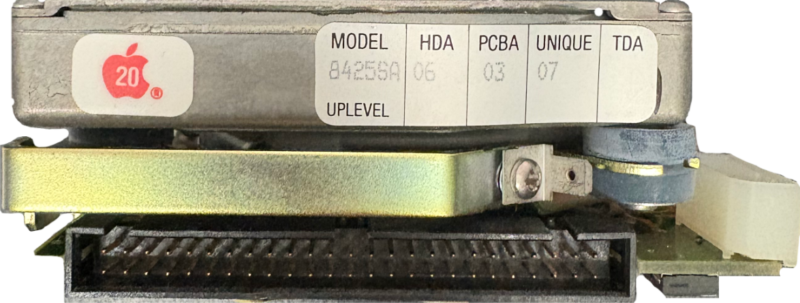
We recently received this very cool old Mac drive to recover. It came from a Macintosh SE, and the user was happy for us to share the information about the case.
Specs
| Brand | MiniScribe |
| Model | 8425SA |
| HDA | 06 |
| PCBA | 03 |
| Unique | 07 |
| Capacity | 20MB |
| Interface | 50 pin SCSI |
| Year | 1990 |
Cloning
The first step to recovering an old drive like this is the physical connection. We have numerous old machines with old interfaces, as well as some old hardware designed for data recovery from those systems. Although the disk is stamped 1990, it has a fairly modern (for the time) 50-pin SCSI connection.
We connected it to our recovery machine, and powered the drive up. We were expecting it to be a bit noisy and maybe need some cleanroom work, but were pleased to see that after a bit of calibration we could get a successful ID from the drive. No time for messing about, we started cloning off the sectors to a file, and managed to get all but a handful of sectors read successfully. It’s possible to retry the sectors again later, but we always wait until we’ve got as much recovered before we do that. As it turned out, we couldn’t read those missing sectors at all, so we marked them as bad and moved on to the next step.
File System
The disk was from a Macintosh SE 1/20 and originally running System 6. This means it was formatted as HFS Standard. Our recovery software can understand that format, so we loaded up the disk image file and ran a file recovery. The data came off in good condition, with all original file and folder names. This is when we started to see the quirks of old Mac drives. We’ve been doing this long enough to remember this stuff, but it could easily overlooked.
About old Mac files
It’s standard now, even on Mac to have file extensions for every file to tell the system how to open it. *.doc or *.docx for documents, and *.jpg for images etc. This wasn’t the case for early Macs. In fact even up to Mac OS 9, not all files had extensions. The Mac didn’t need them, so it was only an issue if you shared files with PCs. This probably lead to the long standing belief that Macs and PCs don’t work well together.
A partial solution
We have a tool that can scan over a folder full of files and see if it recognises the contents of the file. It can optionally add the guessed file extension to the files. We took a copy of the files, and ran it through the tool. It was able to recognise the document files, and some FileMaker databases.
And the rest?
Some other files are not so common, so it couldn’t identify them. In particular, drawings made in SuperPaint. This lead us to plan-b…
Emulation
Fortunately vintage Macs can be emulated really well on modern hardware, so we decided to fire up a Mac emulator and load the disk for a closer look. Running this virtual Mac environment allows the files to be accessed as they were back in the day.
It’s an interesting process, so I’ll post follow up soon with more info about loading a recovered disk image into an emulator.
Leave a Reply