Tag: Data Recovery

  • First, Do No Harm

    First, Do No Harm

    The maxim “first, do no harm” is a great first rule for data recovery, and is at the heart of our whole approach. If you’ve lost data, it’s only natural to panic, but the safest thing to do is stop and get advice. It’s usually best to switch everything off, but there are rare times where you wouldn’t want to do that either.

    When you should switch off a failed disk

    If the drive has failed completely and you can’t access the data, definitely switch it off. If the disk is clicking, or making strange noises, switch it off. Certain types of hardware failure will get worse if you leave the drive powered on. If the heads have been damaged, they could scrape all the magnetic storage coating from the disk. When the heads are stuck on the disk, they can be wrenched off and take a chunk of disk with them.

    If you’ve accidentally deleted some files from a disk, switch it off. You might not realise but as your computer sits there idle, there are all sorts of processes, downloads, updates and other background tasks that will be writing to your disk. Also  a system task could attempt to repair the disk, or reset the computer and overwrite your files. All of these issues are avoided if the device is turned off. Your computer will happily reuse the space where your deleted files are, so once files are deleted it’s crucial to stop the computer accessing the disk. Once data is overwritten it really is gone for good despite what anyone tells you.

    If you have a cloud service setup, you should download the data using another computer & disk. Make sure you check the downloaded data thoroughly before writing it back to your original disk. If you write the cloud data straight back to your computer, you’ve lost any chance of getting more data back if there’s something missing.

    When you shouldn’t switch off a failed disk

    If the data shows up at some point, copy it straight off. Hard drives are complicated machines, but sometimes the stars align and give you one last chance to access the files. Make sure you have enough free space on another disk, and make a copy of your files while you still can. There is a chance that if you power the disk down it might never show up again. Don’t waste that chance!

    ⚠️ If you start copying files and the speed goes down, while the time remaining goes up, you should stop and get advice. The hard drive could thrash itself to pieces trying to read the files and make recovery much more difficult. You don’t want to leave the disk unattended during this process, as it could fail and need to be switched off.


    Contact Us Now…

    For a fast reply from a real person.
  • Meltdown and Spectre Data Recovery

    Meltdown

    More than enough has been written about the Spectre & Meltdown CPU vulnerabilities so I won’t go over them directly here. If you’d like more info, I’ve included some links at the end.

    My interest is more with the trouble caused by the intended fixes. Despite CPU manufacturers testing the fixes for some months, in certain circumstances they are causing random reboots, and other performance problems.

    Safely Remove

    Spectre
    To “Safely Remove” a disk is standard practice to avoid filesystem corruption. In simple terms, the computer stops writing to the disk and then you’re safe to unplug it. In the case of a random reboot, the computer doesn’t get the chance to finish with the disk.  A crash at a critical moment can damage the filesystem and render the machine un-bootable. Even if the system can recover itself, if you crash enough times your chances of trouble increase. It’s hard to trust a system that could randomly reboot at any moment.

    A Solution?

    Until we get fixes from the manufacturers, there’s not much else we can do. Now would be a really good time to make sure your backups are working and up-to-date. These fixes could take a while to stabilise, and in the meantime you could be one random reboot away from data loss.

    Sources

  • SQL Database Data Recovery In Hampshire

    Despite falling out of favour in giant tech companies, there are not many businesses in the UK that don’t use some sort of SQL database. Whether that’s a website running WordPress & MySQL or an intranet hooked up to an MSSQL DB, SQL is still everywhere. Even iPhones use SQLite to store Notes and other data inside apps.

    SQL Database Data Recovery In Hampshire
    SQL Database Data Recovery In Hampshire

    On Disk Problems

    Sometimes the fault lies with the underlying disk, Virtual Machine, or RAID array that the file is stored on. First we solve the disk problem and then extract a working copy of the database.

    Inconsistency

    Another issue with database files is that they can go corrupt silently, and you might not notice until hours, weeks, or months later when a crucial process fails.

    Our SQL recovery tools, alongside our hard disk & RAID recovery services can help get your lost databases up and running again with minimal fuss & downtime.

    • Peter MorganThese guys are amazing!! Really helped us out in an impossible situation with a corrupted SQL database which even the software provider couldn’t fix. Not only did they fix the corruption but they did it quickly and super professionally keeping us informed at every step of the way. I have used Dataquest many times and over the years and they always deliver. 4th July, 2017

    Common Applications We Recover SQL From

    • Web server MySQL, PostgreSQL
    • Windows Application MSSQL
  • Why Cloud Backup Is Not Enough

    Why Cloud Backup Is Not Enough

    If you have a computer, tablet, or mobile you most likely have some of your data stored in the cloud. It may just be syncing your contacts or calendar, or even backing up your photos from your iPhone or Android phone. Whatever the reason it is now a cheap way of keeping your data safe. Or is it?

    Never take for granted that your data is getting backed up correctly. Check it yourself.

    I had a situation just recently where my wife’s iPhone had just gone through a 60℃ wash.

    “That’s okay,” I said,  “We have all your data on iCloud…”

    A few days later we replaced the phone (thanks insurance) and restored the data back from iCloud.  That’s when we discovered iCloud hadn’t been copying Contacts and some other data. Fortunately I had  also kept another backup using iTunes on my Mac so was able to restore from there.

    Now would be a great time to check your iCloud settings and make sure there’s a green tick next to everything you don’t want to lose!

    Another thing to look out for, especially if you have a lot of data, is your upload speed. Unless you have fast broadband,  uploading large amounts of data can take time. You’re unprotected until all of the data has reached the cloud. In some cases it can take hours, even days, depending on how much data you have and the speed of your network.

    Once you have uploaded all your data, your device will only need to copy new changes so won’t take so long. As a Plan-B, don’t forget to backup to a computer once in a while. You can thank me later.

    Don’t leave it until it is too late. You never know when your phone will take a spin in the washing machine.

  • How To Troubleshoot Western Digital Elements External Drive

    How To Troubleshoot Western Digital Elements External Drive

    Elements is the basic brand of external drives from Western Digital. These no-frills disks are usually great value, but when they fail have a few quirks that can make recovery a little awkward. For example the small pocket sized drives usually have a soldered USB port that cannot be removed. There is also automatic encryption, even if you’ve never set a password.

    Symptoms of WD Elements Failure

    • LED permanently lit / blinking
    • LED not lighting at all
    • Clicking / ticking noise
    • Disk is not formatted. Do you want to format it?
    • Unable to see your data in Windows or macOS
    • Unable to copy or read files

    Troubleshooting Ideas

    If you have problems with a WD Elements drive, you should make some checks to see if you can narrow down the fault. Be aware that opening the external drive case will probably void your warranty with Western Digital. If there is important data on the drive you should seek professional data recovery advice before you try anything.

    That’s the warning out the way, so lets have a look at some troubleshooting.

    1. First check all cables are plugged in securely, and not damaged or frayed. If you have an identical spare cable you can try it, just be gentle.
    2. If trying a different power supply, make sure the voltage matches exactly. Amps can be higher but not lower.
    3. There is little point dismantling a WD Elements drive, as there is usually no SATA connection inside. Even if you manage to bypass the USB Port, your data will be encrypted.
    4. It’s worth plugging the external drive into another computer. If it seems to work you should copy the data off straight away. The drive could still be faulty & fail again soon.
    5. Whatever you do, don’t dismantle the actual hard drive. Hard drives are built in controlled clean-air environments and even the smallest spec of dust can cause permanent damage to the drive.
    6. These external drives are quite unique in the way they work. It is not possible to replace the circuit board (PCB) on these disks, as your PCB contains important encryption keys. On the offchance that a replacement PCB worked, your data would be scrambled anyway without access to specialist decryption tools.

    If you are looking for a data recovery service for your external hard drive have a look at our external drive recovery services.

  • Old Industrial Equipment Data Recovery

    Old Industrial Equipment Data Recovery

    It’s always interesting to see how a complex manufacturing line can be run from such old hardware. In this case we were sent a custom PC from a  machine that is used to fill and cap bottles.

    The first problem was trying to get the case open to remove the hard drive. There is no ifixit guide for this thing!

    Old Industrial Equipment Data Recovery
    Old Industrial Equipment Data Recovery

    Inside I found a 20GB Seagate laptop drive (dated 2007) running Windows 2000 along with the programs that control the machinery. The hard drive was connected to a proprietary motherboard that in turn connected to the machinery via serial ports.

    In this case, data recovery was not enough. What the client needed was a full working copy of the failed disk to reinstall into the system. The aim was to get the kit up and running and return it to the customer so they could carry on with work as soon as possible.

    We’re set up to handle exactly this sort of problem, so I got this recovered and returned within two days.

  • Seagate Barracuda Ramp Weakness

    Seagate Barracuda Ramp Weakness

    During a recent RAID 5 recovery attempt, John made an interesting discovery inside the two failed disks. The plastic ramp that the heads park onto when idle had snapped in the same position on both drives. We don’t know if the heads got damaged first, and then broke the ramps during parking, or if the ramps broke first, damaging the heads as they parked. The client told us the disks were not dropped or jolted. Whatever the cause, both disks had scratches to the delicate magnetic surfaces. In this case, two failed disks from a four disk RAID 5 means the data recovery is not possible.

    Old vs New

    The other two disks in the RAID had different firmware and don’t show the same fault. We don’t know if these disks have the other (older?) more robust ramp system that we’ve seen in similar disks.

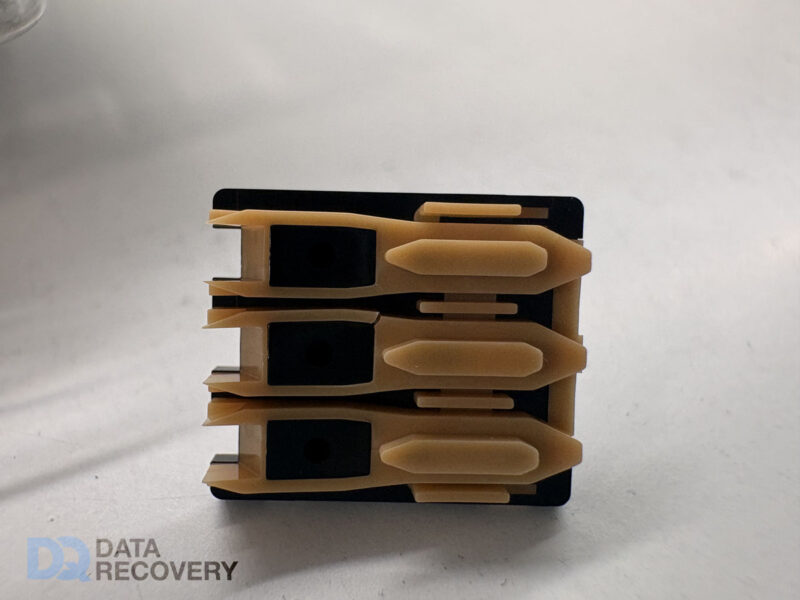
    Seagate Barracuda Head Ramps
    Seagate Barracuda Head Ramps (left is damaged)

    More Problems With Seagate Drives

    These ramp problems are the latest in a long line of faults for Seagate.

    Disk Info

     Failed DiskFailed Disk 2025Working Disk
    Model NumberST3000DM001ST3000DM001ST3000DM001
    PN1CH166-306ICH166-0481CH166-302
    FWCC29AP19CC26
    Date143541530413407
    Site CodeTKTKTK

    Interestingly, the surviving disks in this RAID array were dated 2013, and the failed disks 2014. I would have expected the older disks to fail first.

    Update 2021

    This post was linked on Hacker News, and has some interesting comments – https://news.ycombinator.com/item?id=27781146

    Update 2025

    We just received another of these disks from an iMac with the dreaded snapped parking ramp. This was part of a Fusion Drive. Despite the relatively minor looking crack, it caused severe enough physical damage to the discs to prevent recovery. Interesting that the crack matches the same position as the original 2016 photo above.

  • SandForce SSD Data Recovery Problems

    SandForce SSD Data Recovery Problems

    The low prices and high speed access of the Sandforce controller made it an appealing option for SSD manufacturers such as Toshiba, Intel, Kingston & OCX. But it soon became a problem for users when the SSD devices using these controllers started to fail in their computers after just six months of use. Usually it resulted in the device not being recognised by the computer bios, and not functioning at all.

    That was okay if you were happy to have it replaced under warranty by the manufacturer. The problem came when you wished to try and recover critical data that may have been stored on these SSD’s. The use of full hardware encryption on the controller and the device, meant that the data could not be recovered, even when using low level data chip removal.

    Fortunately today these controllers are not so popular, and as a result most mainstream manufacturers do not use them. But be aware that they can still be found in some non branded SSD’s.

  • APFS Data Recovery

    When Apple release the latest version of macOS (named Sierra) in Autumn, it will include the new APFS filesystem. Apple haven’t launched a new FS for a long time, and this filesystem won’t work for bootable disks at first. Eventually Apple will make this the default filesystem across the whole product line, from the iPhone, through to the Mac.

    APFS Data Recovery
    APFS Data Recovery

    APFS Upgrade In Place

    I have heard that Apple will release a tool to upgrade an existing HFS+ volume to APFS. If you run the upgrade I strongly advise you to make at least a couple of backups first. I would suggest a Time Machine backup and a bootable full disk copy, with online backup if you have it. While the upgrade is cleverly designed to minimise the risk of disk corruption, there is always the chance that failure could leave you with no option but wipe & start again. This is especially true of older Macs that you may have updated through multiple OS versions and accumulated all sorts of nasties along the way.

    APFS Data Recovery

    We are already working through the APFS documentation to keep ahead of these failures. We will have some recovery tools ready soon. As with most recoveries, the most important thing is to stop as soon as you hit a problem. Remember my new catchphrase, “Most damage to data happens AFTER the original failure!” Or, “It’s not the failure that killed the data, but the failed repair.” (I know, snappy right.)

    If you’ve lost data from an APFS disk, contact us now, or have a look at our Mac Recovery Services for more info.

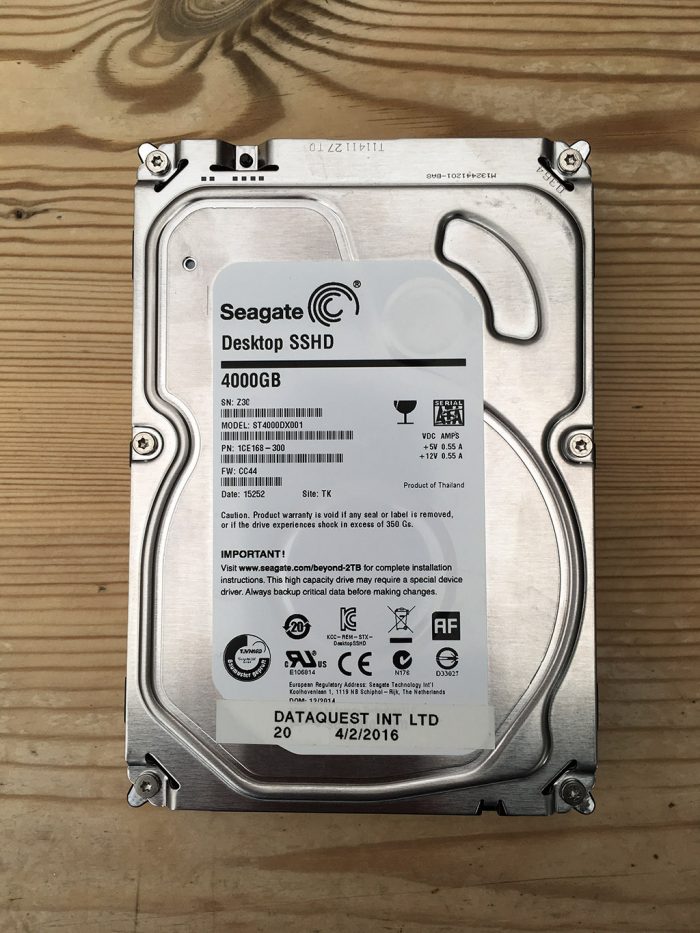
  • Seagate SSHD ST4000DX001 Data Recovery

    I previously posted about a Seagate SSHD ST500LM000 hybrid hard drive which failed to spin. This hard drive was put into our R&D process due to the type of the failure and further analysis confirmed that the problem was relating to the Solid State part of the drive. At the time I had only seen this type of failure with the Seagate Thin SSHD laptop drives. But since then we have now received Seagate desktop SSHD hard drives with the same type of failure.

    Because the SSHD hybrid drives are a cheaper option to SSD drives I am seeing more of them in for data recovery. Also as these are still mechanical hard drives, I am seeing many of the same failures as I do with standard hard drives. For example Electronic Faults, Dropped Drives, Water Damage etc.

    ST4000DX001 Data Recovery