Since we started offering our specialist data recovery services back in 1998 (😱) storage device capacity and speed has increased almost exponentially. New disks at the time were 6-30GB, but many disks we saw were much older and lower capacity. Now it’s common to see 8TB+ disks and even 100TB. Also physical storage device size has reduced to a mere 2.5″ form factor for a 100TB SSD or 6TB mechanical hard drive, and even smaller for “blade” SSD’s.
Blade SSD
Keeping up with changing technology is crucial in being able to offer data recovery for the latest storage devices.
We do still see vintage storage come in for data recovery. From floppy disks, CDR and DVD+/-Rs, as well as removable cartridge media of all types, and of course old hard drives. So we need to keep old technology knowledge and hardware to support these old devices.
We’ve seen many trends come and go during our time:
External drives with soldered USB-interfaces instead of removable bridge boards (which are now the norm).
External RAID drives, required when disk capacities weren’t growing fast enough.
The move from spinning disks to Solid State Drives
Storage chips soldered directly to motherboards instead of discrete removable drives.
Data stored on phones!
We’ll see if the trend towards AI starts affecting storage drives too.
We recently had an interesting case to recover. Although the disk was just a normal 20GB IBM Travelstar1 from circa 2001, the contents were not so common.
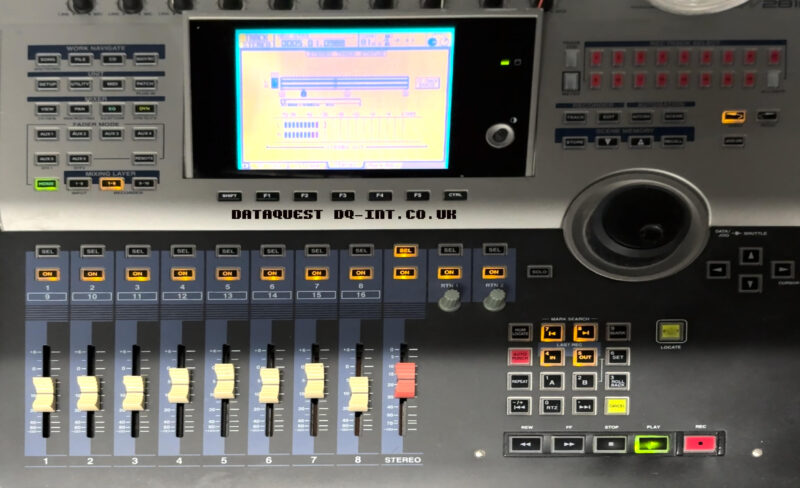
This disk was from a Yamaha Audio Workstation; A combination of a multi track recorder and mixer etc. It’s a lovely big lump of kit, with motorised faders and a graphical display.
Sounds Like Trouble
Problems started when the user was in the middle of an operation saving something, and the device stalled. After a hard-reboot, the disk was reportedly unreadable. Nightmare. There is no capability on-board to self repair a damaged disk, so that’s where we came in. We’ve recovered the data from similar machines, but never this exact one.
The Recovery
First things first, we connected the disk to our diagnostic kit. After a bit of complaining, the disk reached a ready state and allowed us to start reading sectors. We were a long way from success, but this was a good start. After a bit of back and forth, we eventually had a full copy of the whole disk. We transferred this copy to a suitable old 2.5″ disk, and installed it into the machine. The AW fired into life, and then reached a screen that reported “Loading Song Info…” at a frustrating 96% it stopped and reported an error.
Software
This machine doesn’t use PC formatted disks, so there was no software available to scan and discover the songs. After finding a Facebook group for the larger AW4416 device, I was lead to an obscure software tool that could interpret the disk format and extract songs, tracks or whole device backups. I tested the free version first and was able to read the song list and extract sample audio. That was good enough for me. I bought a license for the full tool, and got all the songs exported to Yamaha CFS backup files.
New Disk
The original plan was to convert the machine to CompactFlash. I’ve done many similar conversions for everything from CNC milling machines to iPods, and yet no combination of card or adapter would work reliably. The only thing that did work reliably was an old 4GB SanDisk Extreme III card. but that was too small to take all the songs. The newer 32GB Transcend 133x cards are reported to work, but didn’t for me.
Plan B
Instead I went though our stock of 2.5″ laptop disks and found a nice clean 60GB HDD from a Mac PowerBook G4. I tested and wiped it, and then installed into the AW. On boot up it asked if I wanted to format the blank disk so I did. Then I removed the disk again and attached it to the PC to reload all the song backups. After reinstalling into the AW2816 I was pleased to see the songs all loaded and playing & scrubbing through tracks without issue.
The workstation is now back with the user and being put through its paces. We’ve also advised on a backup regime to help avoid future disasters. It seems to be one of a minority with a functional CD burner, so the plan is: Regular song backups to CD, and periodic whole-disk backups to a computer.
Original Disk: IBM Travelstar IC25N020ATDA04-0
Replacement Disk: Fujitsu MHT2060AT
Footnotes
We’ve recovered 143 of these since we started tracking model numbers in 2003 ↩︎