
Data Recovery Blog
A selection of our articles, written by us and not Ai generated. These are generally details of some of the recoveries we’ve completed, or other associated info.
-
Recovering Deleted Data
In the vast majority of cases, deleted data is actually still lurking around on your hard drive. If you put data in the Recycle Bin or Trash, and them empty it, all you are actually doing is telling the system that it can reuse those parts of the disk when it wants. Until you replace those areas with new data, the old data will still be there. The Filing Cabinet The tried and trusted analogy is of a filing cabinet. When you delete a file, you are removing the index card from the front of the drawer, but the actual…
-
Why RAID Can Be Bad For Business
RAID is often touted as the silver bullet in data storage. Increased storage capacity, resistance from hardware failures and improved performance. While these are all valid upsides to a RAID setup, there are also a few downsides which need to be addressed. 1. Extra Storage. RAID can allow for a huge pool of storage, but with that storage comes great responsibility. You should factor in at least enough capacity to backup the RAID data somewhere else. If you can only afford 8TB of storage then you should only use 4TB for data and the other 4TB to back it up;…
-
Burning Linux ISO to USB Using a Mac
My main computer is an old MacBook Pro. I often download Linux ISOs to install on other computers. In recent Debian-esque releases this is actually really simple. 1. I find it quicker and easier to install from USB so first insert a USB pen / stick of some sort. Note: This USB stick will be erased, so don’t use one with data that you need to keep! 2. Next we need to find out which number has been assigned to the USB stick. If you only have one disk in your Mac then the USB will usually be disk1, but…
-
Accidentally Installed Windows On Top Of Mac OS X
We have just completed a complex data recovery, where a Mac system had been inadvertently overwritten with Windows. The Mac drive originally had over 500GB of data, so we expected to get most of it back, we just didn’t know how good the structure would be. It helps to visualise the layout of the data on the disk. before it was overwritten, the data would have looked something like this: Although the fresh Windows system is much smaller than the original data, it prevents you from seeing any of that old Mac data. Once we made copies of the drive,…
-
What is a Digital Negative
We see various types of camera media come into us for data recovery, with surprisingly varied file formats. Many camera manufacturers use their own raw format, alongside various JPG options. This raw format is sometimes known as a digital negative, containing (mostly) untouched data straight from the camera. These raw format images can be ten times the size of JPG images. The benefits of raw files are to allow post-processing without the loss of quality from JPG files. Settings like sharpness, saturation and white balance can be changed at a later date using photographic software. Below are a few of the different raw file…
-
ST373454LC Unusual RAID drives
We have recently recovered a RAID 5 array which consisted of three of these ST373454LC SCSI hard drives. These are solid, weighty drives, which don’t give off a great deal of vibration, despite spinning at 15,000 rpm; 3 times faster than most laptop hard drives! Upon opening one of the drives for cleanroom rework we discovered why these drives spin so quietly. In the picture below you can see that although the drives are standard 3.5″ form factor, they actually have 2.5″ disk platters. These smaller disks create less drag, and therefore can spin faster without stability problems. These drives are…
-
Extreme Close-Up: Toshiba Hard Drive [video]
This is a video of a functional Toshiba laptop drive. Using a macro lens, we are able to see what happens when you read or write data to or from a hard drive. You can also see how the hard drive parks the heads off the disks when the power is shut off. This is to protect the hard drive from shocks during transportation. It’s my first one of these videos so you can see my reflection in a couple of places, when I lean over to send different commands to the drive.
-
Old Quantum Pro Drive 250 MB 50 Pin SCSI
This hard drive was opened in our clean room for internal rework. In the process we found that the rubber crash stops attached to the VCM magnet were perished. They were oozing sticky rubber solution contaminating the drive internally. A word of warning to anyone who may still have one of these hard drives with critical data. I would recommend back up and replacement. This particular hard drive was from a synthesiser that had stopped working.
-
Archiving Old Data
I recently read a brilliant article about the guy that wrote the original Prince of Persia game for the Apple II in the 80’s. He had long since lost the original source code, until an old box of floppy disks was uncovered in his father’s apartment. Sensibly, he enlisted some experts to help with the data extraction, and after a day of collaboration was able to release the source code online. This got me thinking. Although I am meticulous with my backups of current data, I still have boxes of old software on floppy disks, which are happily degrading as we…
-
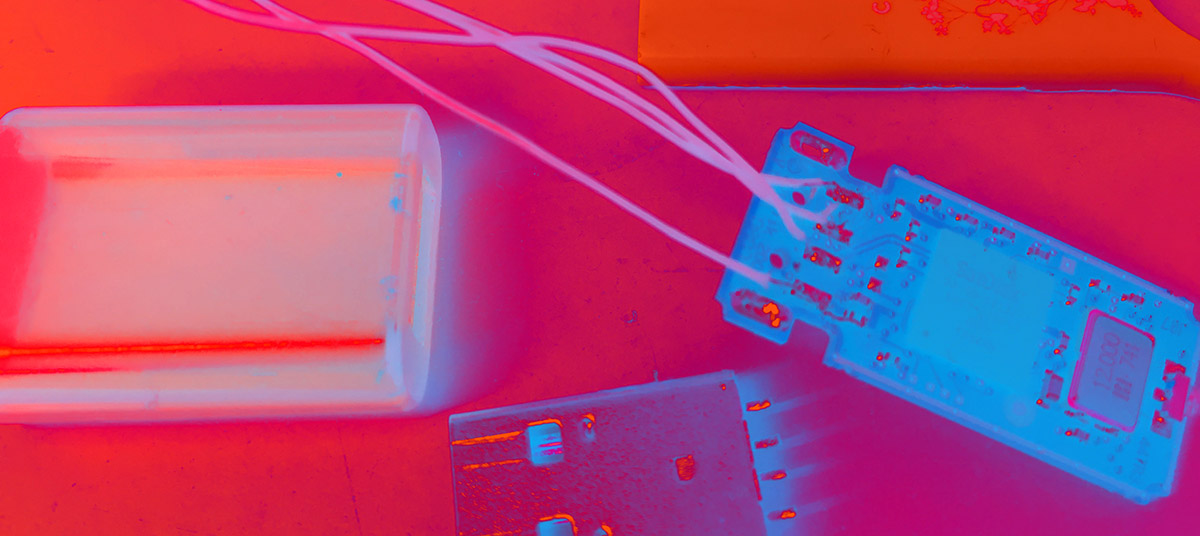
Cheap USB Pen Data Recovery
Our low cost USB Pen & Camera Flash Media Recovery Services can recover data from physically broken, formatted and deleted USB Pens & Camera cards. We have just received an 8GB USB pen with a broken connector. The customer started phoning around and was shocked by the costs he was given. He then called us and was pleased to hear that we only charged £89 if the work was successful. This includes dismantling and repair of the USB Pen even when it appeared to be beyond repair. The recovery was 100% successful.