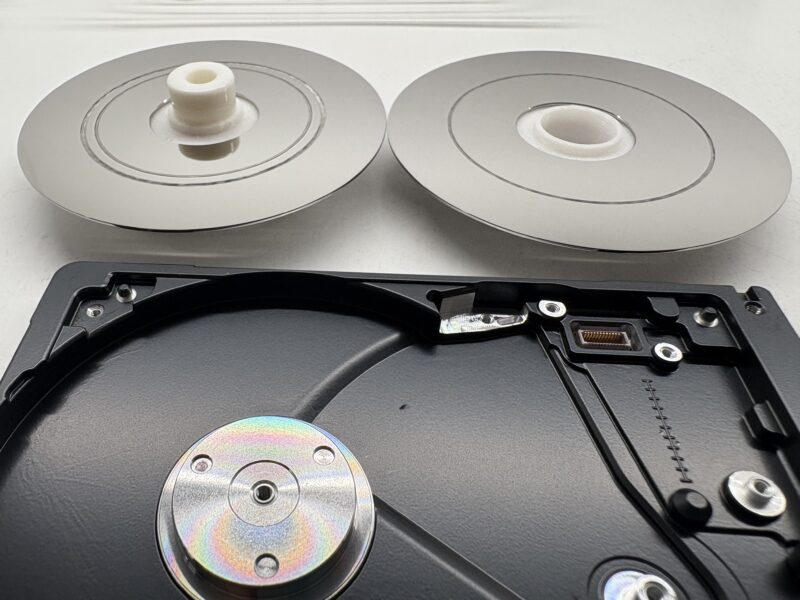
We often get called Saviours or Magicians. But sometimes the magic wand just doesn’t work. This unfortunate drive had serious media damage on both discs and both surfaces. You can see the scratches are so deep they’re down to inner glass layer.
The drive in question is Seagate Ultra Slim Portable. The damage maybe not be as bad as some we have seen in the past, but it’s still bad enough to prevent recovery.
We recently completed an extremely difficult recovery from a fire damaged hard drive. The drive was stolen from an Annke CCTV system during a burglary and then set on fire.
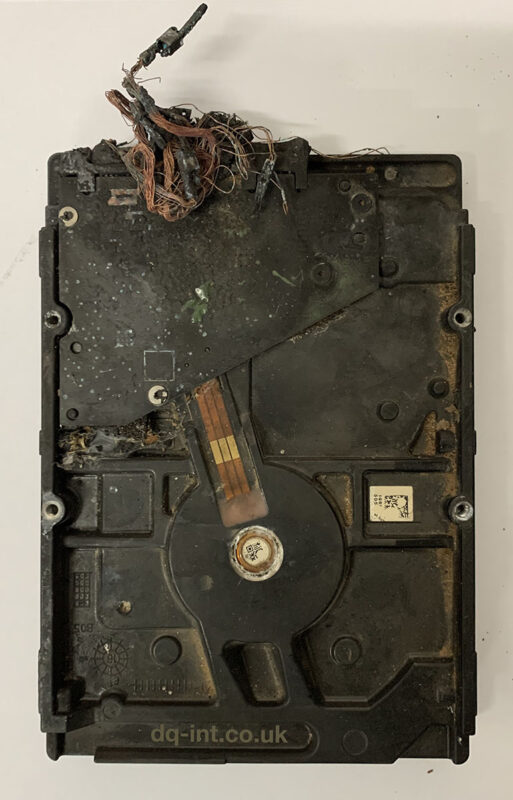
This is what we received:
Photo of a burnt Seagate Hard Drive
Despite looking like it had fallen from space, we could recognise that it was a Seagate drive. Most of the label was burnt off.
Where to start with the recovery
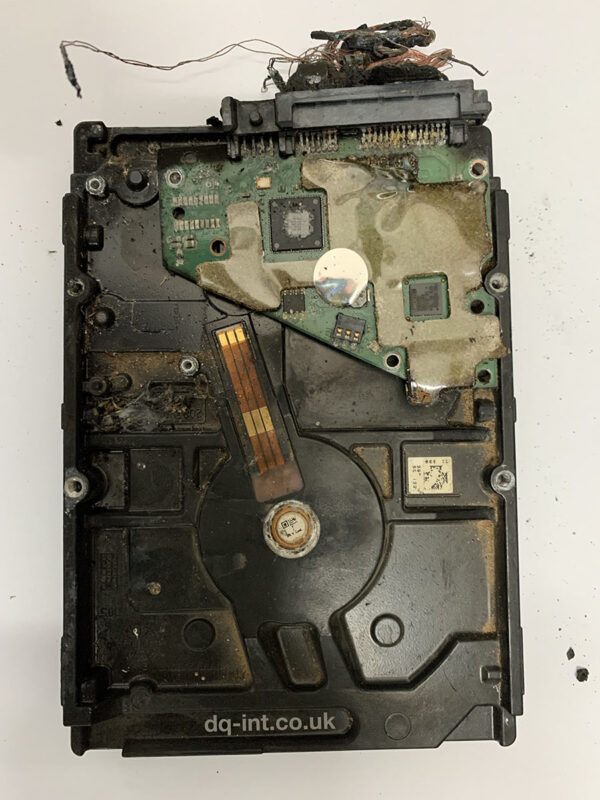
It’s easy to get overwhelmed by a case like this, but it’s important to break the problem down into manageable chunks. First we needed to extract the unique information from the circuit board (PCB). The board was black and charred from the outside, but the delicate underside was still green, and it looked like the main components survived. With a little bit of a clean-up we were able to read the required info and transfer it to a suitable (non-burned) donor board.
Seagate Burnt Circuit Board (PCB)
Next, we needed to turn our attention to the inside of the drive. We gave the outside a thorough clean first, to avoid transferring contamination inside. Then we opened up the drive to assess the damage. The gasket between the top cover and main device had turned to a gluey mess, so we had to be careful separating the two.
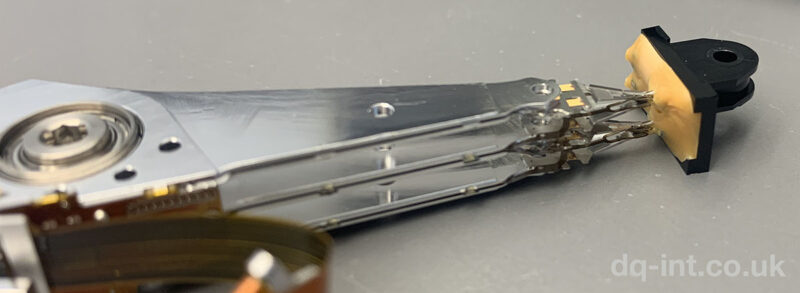
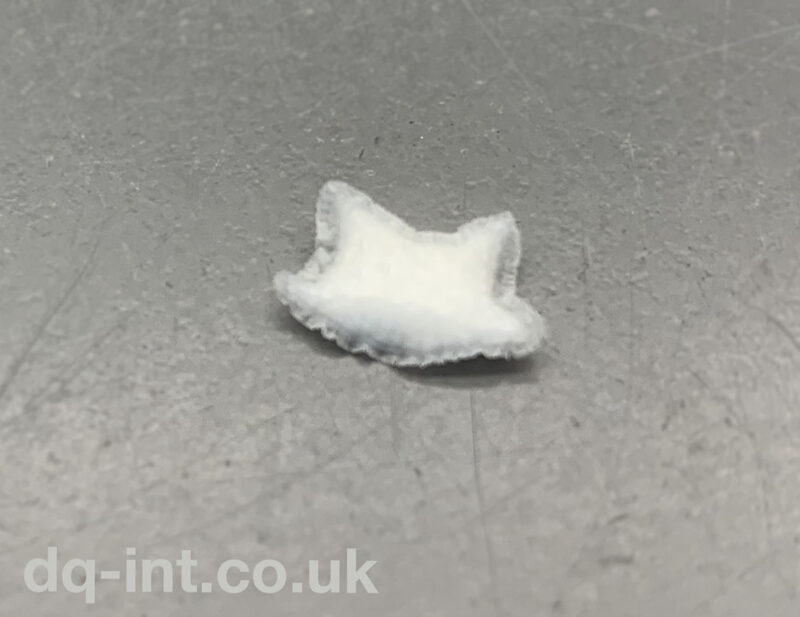
It’s important to point out that we haven’t attempted to power up the drive so far. Spinning up a drive in this state will never end well, and it’s a good job we didn’t. The heads were melted into a plastic blob that was once a parking ramp, and the particle filter was transformed into a stiff little pillow. By some miracle, the discs (platters) themselves were in surprisingly good condition. The pack of discs was also turning freely, so the motor was not stuck.
Seagate heads melted into their parking ramp
We replaced the filter with one from a similar drive, but the heads would be the real challenge. It wasn’t possible to read the exact label information (it was burnt off), so confirming a match for a suitable donor was a challenge. We could read some of this missing info from the circuit board that we’d backed up earlier. There was another worrying sign on what was left of the label. A warning that the Warranty was valid only in China, and Exclusive to China. We worried about trying to source such a drive if it was only intended for the Chinese market.
Shrunken particle filter
We did find a suitable donor, and installed the new heads and parking ramp into the drive. We also borrowed the new top-cover as it was clean, and still had a proper gasket.
Moment of truth
The drive came ready, and although it was reporting some problems, allowed basic access. We were able to carry out our usual Seagate process, and start cloning sectors to another drive. This process went extremely well, and only tripped up a handful of times. In the end after multiple passes, we had skipped just 100MB of the drive due to errors, and successfully extracted the 2-3TB of CCTV footage.
In total, the whole process took just under three months, mostly due to delays finding a suitable matching donor, and then the careful imaging process.
The best part of the story is that the burglar was clearly visible in the footage so will hopefully be brought to justice.
The last time we posted about these drives was 2015, and we’re seeing another surge of these drives failing again.
In the past week alone, we’ve seen two separate pairs of RAID mirrors (four drives total), an iMac Fusion Drive, a standalone iMac drive and an external Seagate backup drive from a PC. All failed with no known impact, and all unrecoverable due to media damage.
What is media damage?
In a hard drive, the discs are the media, and damage is caused by impact from the heads or another internal part. Usually this takes a certain amount of force and will be the result of the drive being dropped or knocked over. For some reason, these Seagate drives seem to also succumb to damage without any known impact.
ST1000DM001 RAID Disk
Is it just a head crash?
Yes it is. However head crash is a very specific term that has now been abused to mean many other general faults. It’s very common to hear people talk about a crashed hard drive, when all they really mean is the drive is not accessible.
Is this unusual?
For other common hard drives, when parts wear out or fail, it doesn’t usually result in media damage. Often we can replace the heads and get the drive running, at least well enough to extract the data one last time. Dropped drives always run the risk of media damage, but drives do have protection from such impacts, so it’s always worth pursuing if the data is important.
What’s the answer?
If you’ve already got a failed Seagate drive, get in touch with us ASAP, as there really is a limited window of opportunity to get the data back when these fail. Recovery is possible if we get them soon enough!
If you’ve got any of these drives installed anywhere, it’s probably a good idea to backup and migrate over to some new disks as soon as you can. We don’t give specific brand recommendations, as we strongly believe in running a full-time backup regardless of the disk you choose. In an ideal world, any disk you own should be replaceable without any loss of data by loading from a backup.
Disks to watch out for
ST2000DM001
ST2000DM006
ST3000DM001
Seagate Barracuda
Seagate Desktop Hard Drive
There may be other similar model numbers too. These are particularly risky in consumer RAIDs, as it’s common to either not notice when the first one fails, or to get two failures in quick succession.
Over the past decade, hard drive companies have been endlessly bought-out and then re-sold. At this point I’ve pretty much lost track of who manufactures which brands now. Since all this restructuring, it’s quite common to see portable Seagate branded drives with Samsung disks inside & vice versa. There are also Maxtor branded versions of those same drives in some markets.
Seagate Samsung HDD. Seems legit.
So what’s wrong with this disk?
Here’s a list of some of the problems with this disk:
Unfinished labelling (the white edges are usually peeled off)
Mismatched serial numbers
Wrong PCB for a Seagate / Samsung disk
Wrong capacity
Misspelled Regulatory as Reaularory (see image below)
European Reaularory Address
I’ve never seen a disk quite like this. It’s from a Samsung external case with a Samsung logo on the front label. It also uses a Seagate model number ST1000LM024. Normal enough so far, however the label shows one serial number while the label opposite the SATA connector shows a different one. Also a third different serial number is reported electronically to the system when the disk is attached.
Hitachi Edge Code Serial Number
The label at the end of the disk is actually a clue to the true identity of this disk. It features the familiar Hitachi / IBM style with two separate stickers & barcodes. The disk is actually a Hitachi HTS5432L9 which suggests a much older 320GB disk that was likely destined for the scrapheap in a former life. Funnily enough, these Hitachi disks had their own strange history of mislabelling.
Fake?
I originally thought this disk may have been a white-label or grey market disk. Some disks get refurbished and are then sold under different brand names in other markets. After a bit more investigation I think it may actually be more sinister than that. This is more like a fake or fraudulent disk, designed to dupe somebody into thinking it is a larger disk than it really is. It appears to the computer as 1TB however only contains 320GB of usable space. This is very similar to the fake flash drives we’ve seen before. The problem with fake capacity disks is that when you exceed the genuine size, the rest of the data usually becomes inaccessible. Also depending on how the disk handles the problem, it could damage the existing data when it fails.
Recovery
Fortunately for the owner of this disk, they had not yet used up 320GB of the disk. In fact this disk failed when the USB connector fell off. Maybe another sign of the poor build-quality of this fake. Once we figured out what we were working with we were able to recover all data. It took a combination of Hitachi firmware repair, careful imaging, and then exFAT reconstruction.
Seagate has another batch of dubious drives in circulation at the moment. These slim disks are often used in external Ultra Slim Portable enclosures, but also appear in laptops. Visually these disks have a new-look design that seems a bit strange at first glance. For starters, instead of a solid metal top cover, these disks only have a partial top lid, sealed by nothing more than the printed label. If you decided to peel the sticker from one of these, you’d be unsealing the top cover and allow dust to fall straight onto the disks. This is BAD.
Aside from the visual differences, these disks also feature a number of new firmware changes that are barriers to recovery. The industry standard recovery tools only have limited support at this stage but the good news is that we can already recover from most common issues.
D.S.A.A (Dead Shortly After Arrival)
Another fun feature of these disks is the way that some of them just fail after a couple of weeks light use. As always, we only see faulty disks here, but it’s always a surprise to see a disk that’s only a few weeks or months old on our desks.
Something we’ve seen more than once is a customer that buys an external drive, copies a load of data onto it, wipes their computer, and then finds when trying to load the data back on that the backup disk has failed. Always remember to take two separate backups when erasing your main disk!
Variability
Another annoying trait with these disks is that they are manufactured from lots of different internal parts. This makes it a nightmare to locate suitably matched heads when we need to replace them.
I have good news for our customers, our developers have been working hard and have produced a solution to the firmware failures of this model hard drive. I posted a blog alerting our customers back in March 2015 when we started to see the problems arise. A solution was tested just before the end of last year and we now have a process that fixes these issues.
We also have firmware fixes and recovery solutions for other Seagate Hard Drives.
It’s always interesting to see how a complex manufacturing line can be run from such old hardware. In this case we were sent a custom PC from a machine that is used to fill and cap bottles.
The first problem was trying to get the case open to remove the hard drive. There is no ifixit guide for this thing!
Old Industrial Equipment Data Recovery
Inside I found a 20GB Seagate laptop drive (dated 2007) running Windows 2000 along with the programs that control the machinery. The hard drive was connected to a proprietary motherboard that in turn connected to the machinery via serial ports.
In this case, data recovery was not enough. What the client needed was a full working copy of the failed disk to reinstall into the system. The aim was to get the kit up and running and return it to the customer so they could carry on with work as soon as possible.
We’re set up to handle exactly this sort of problem, so I got this recovered and returned within two days.
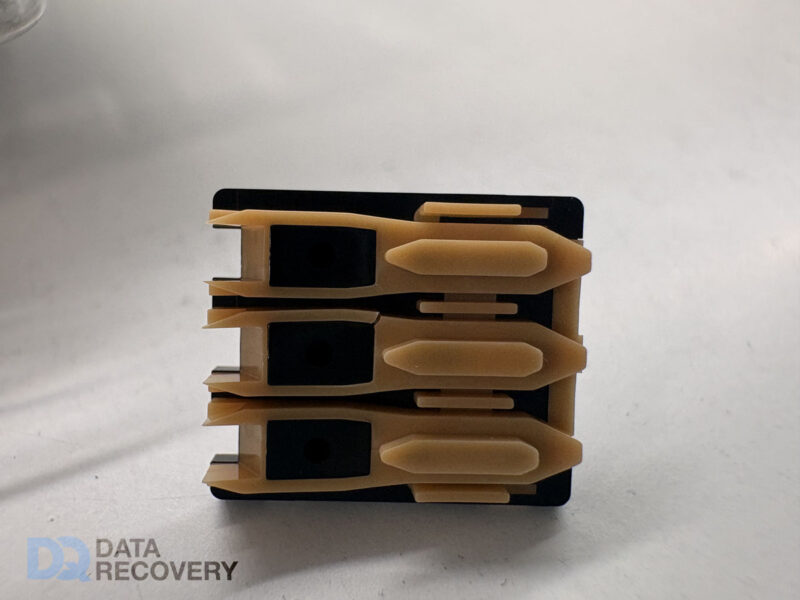
During a recent RAID 5 recovery attempt, John made an interesting discovery inside the two failed disks. The plastic ramp that the heads park onto when idle had snapped in the same position on both drives. We don’t know if the heads got damaged first, and then broke the ramps during parking, or if the ramps broke first, damaging the heads as they parked. The client told us the disks were not dropped or jolted. Whatever the cause, both disks had scratches to the delicate magnetic surfaces. In this case, two failed disks from a four disk RAID 5 means the data recovery is not possible.
Old vs New
The other two disks in the RAID had different firmware and don’t show the same fault. We don’t know if these disks have the other (older?) more robust ramp system that we’ve seen in similar disks.
Seagate Barracuda Head Ramps (left is damaged)
More Problems With Seagate Drives
These ramp problems are the latest in a longline of faults for Seagate.
Disk Info
Failed Disk
Failed Disk 2025
Working Disk
Model Number
ST3000DM001
ST3000DM001
ST3000DM001
PN
1CH166-306
ICH166-048
1CH166-302
FW
CC29
AP19
CC26
Date
14354
15304
13407
Site Code
TK
TK
TK
Interestingly, the surviving disks in this RAID array were dated 2013, and the failed disks 2014. I would have expected the older disks to fail first.
We just received another of these disks from an iMac with the dreaded snapped parking ramp. This was part of a Fusion Drive. Despite the relatively minor looking crack, it caused severe enough physical damage to the discs to prevent recovery. Interesting that the crack matches the same position as the original 2016 photo above.
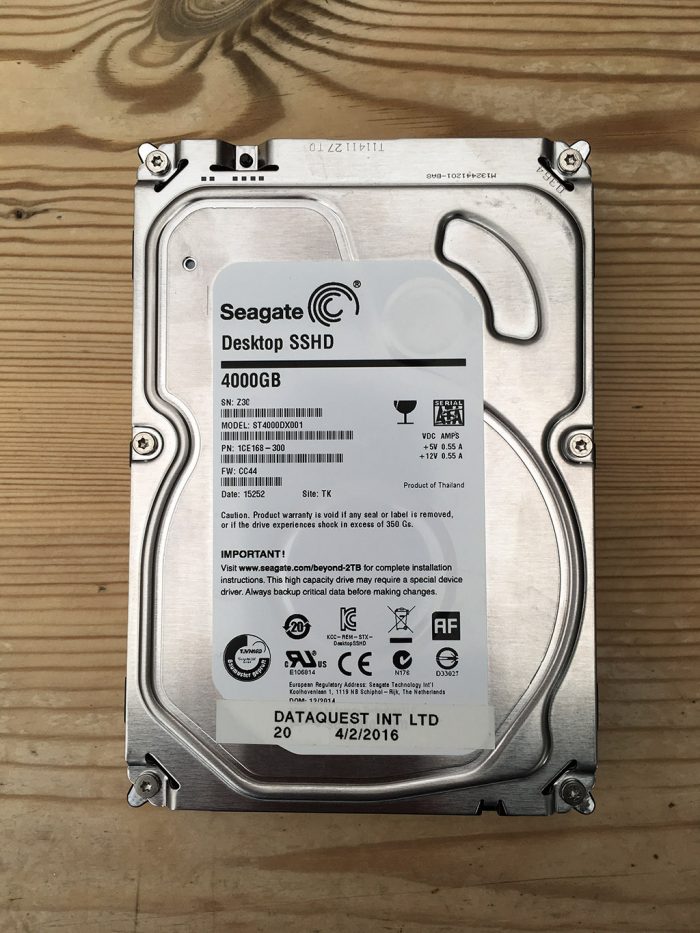
I previously posted about a Seagate SSHD ST500LM000 hybrid hard drive which failed to spin. This hard drive was put into our R&D process due to the type of the failure and further analysis confirmed that the problem was relating to the Solid State part of the drive. At the time I had only seen this type of failure with the Seagate Thin SSHD laptop drives. But since then we have now received Seagate desktop SSHD hard drives with the same type of failure.
Because the SSHD hybrid drives are a cheaper option to SSD drives I am seeing more of them in for data recovery. Also as these are still mechanical hard drives, I am seeing many of the same failures as I do with standard hard drives. For example Electronic Faults, Dropped Drives, Water Damage etc.
With the recent floods in the United Kingdom, it is important to know that time can be a critical factor when trying to recover data from mechanical hard drives that have been submerged or damaged by water. Most mechanical hard drives have breather holes that may allow water to enter the hard drive enclosure if submerged. If this is the case then the longer the hard drive is left in this condition the worse the internal damage. Even if the hard drive is left to dry out, internally the damage has already been done. Our advice is not to try this if the data is critical to you or your business.
Any water damage hard drives that we receive go straight into our clean room environment to be dismantled and dried out internally. The hard drives external electronics would also require a cleaning process to prevent any electrical shorting caused by the water residue.
Although Solid Sate Hard Drives ( SSD ) do not have any mechanical moving parts, they are still prone to damage to the data chips and electronics by residue left by the water. Very much as mechanical hard drives they would require dismantling and specialist cleaning to ensure no electrical shorting of components.